


- Suspending a license pauses an idle application, keeps the engineer’s work and returns its concurrent license to the pool.
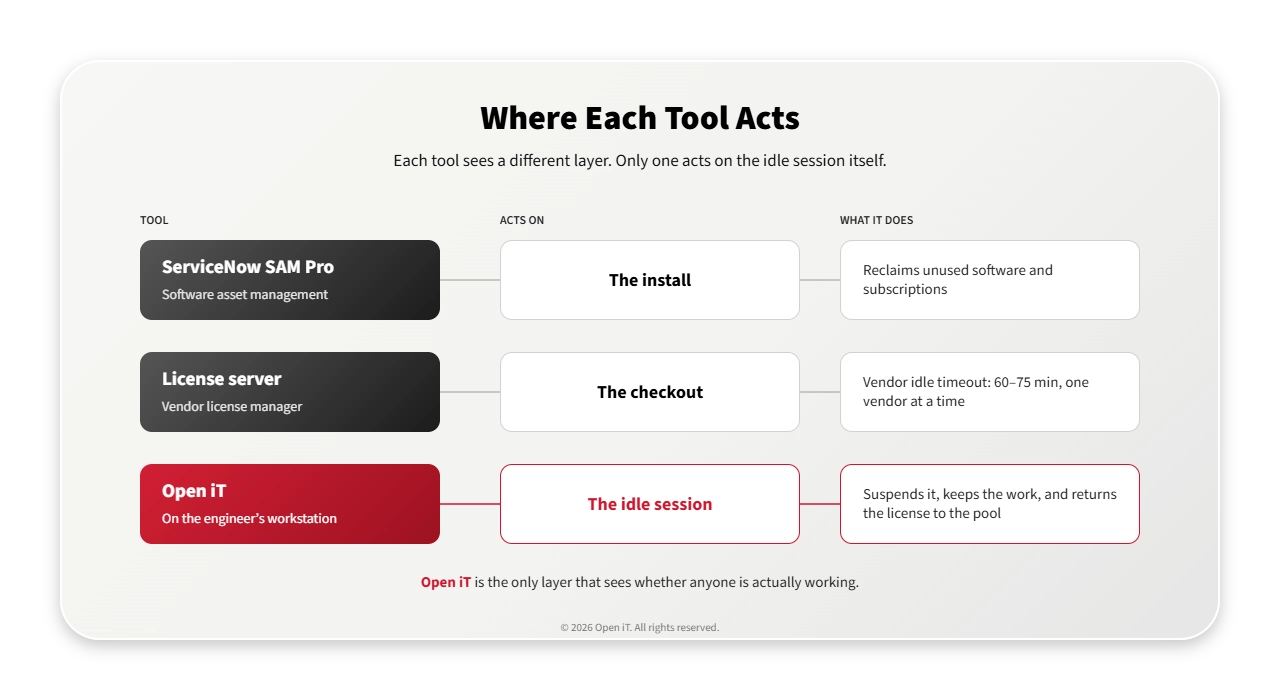
- ServiceNow SAM Pro’s software reclamation removes software nobody uses. It doesn’t free a license from a session that’s open but idle.
- With Open iT, Avio Aerospace planned a drafting pool at 38 concurrent licenses, against the 64 it owned.
To suspend a license is to pause an idle application and return its concurrent license to the pool, with the engineer's work still in place. To reclaim, in ServiceNow SAM terms, is to uninstall unused software or cancel an unused subscription, so the rights can go to someone else. Reclamation doesn't reach a license held by an idle session. Suspension does.
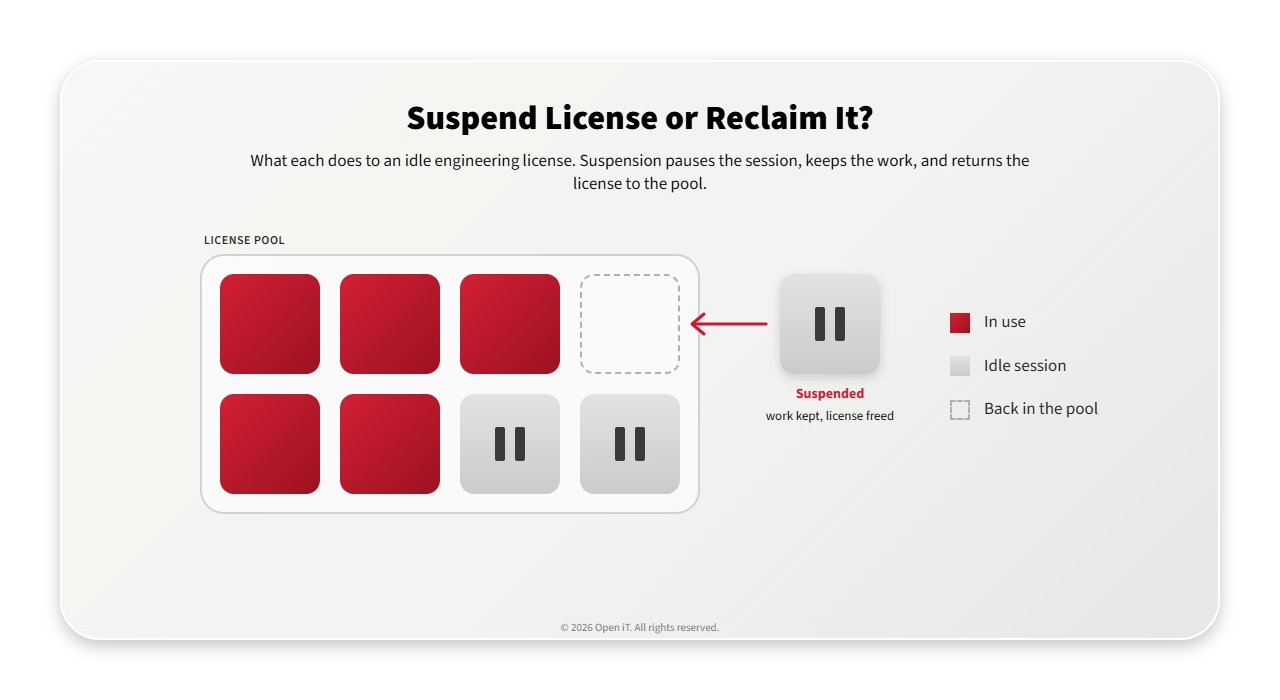
The license you need is checked out, not used
ServiceNow’s engineering license management documentation puts it in one line: “When the user exits the application, the license returns to the pool.” An idle session never exits, so its license stays out until something acts on the session.
That’s the gap to close. You want a free concurrent license at peak without buying more at renewal. You have three options, but only one acts on the idle session.
| Option | What it does | Frees a license from an open, idle session? |
|---|---|---|
| ServiceNow SAM Pro software reclamation | Uninstalls software nobody uses, or cancels unused subscriptions | いいえ |
| The license manager and idle timeout that came with the application | Shows who holds a license. Some vendors add an idle timeout | Only after an hour or more, one vendor at a time |
| Open iT LicenseAnalyzer™ | Sees which sessions are idle, warns the engineer, pauses the application and returns the license | はい |
What your current tools can and can’t see
ServiceNow SAM Pro flags software used too little, then reclaims it by uninstalling it or cancelling the subscription. That’s the right tool for a CFX install nobody has opened in a quarter. It’s the wrong one for a CFX session that went quiet at 8:30. The install is in use, so nothing flags it. Blog one in this series compares the two: how license harvesting works.
The license manager knows who holds each license and since when. It can’t see who is working. A CFX session with nobody at the keyboard may be waiting for its owner, or it may be computing results. From the server, both look the same.
The vendor’s own idle timeout comes closest, but it’s slow and narrow. Ansys’s is off until an administrator turns it on. At its shortest setting, a license comes back about 75 minutes after the session goes quiet. Abaqus/CAE waits 60 minutes by default. Each covers only its own vendor’s products. Forcing a license back at the server doesn’t stick either: the vendor documentation notes that a running application takes it back shortly after.
What it costs
When idle sessions stay invisible, the peak looks like real demand. The renewal answer becomes more concurrent licenses, bought to cover time that sessions spent doing nothing.
Avio Aerospace, which builds propulsion for civil aeroengines, military programs and space launchers, metered a drafting application for a year. It owned 64 concurrent licenses. At no point that year were more than 46 checked out at once. The other 18 sat in the pool, paid for.
The second cost lands on the program schedule. In model-based systems engineering, idle sessions show up as tool contention, stalled analyses and a modeling cadence that slips. An engineer waiting for a license isn’t finishing the model the next design review needs.
Suspend license, keep the work: what changes with Open iT
LicenseAnalyzer Level 3 (Managed Usage) is the part of Open iT LicenseAnalyzer that runs on engineers’ workstations and acts on idle sessions. Here’s what it adds to the tools you already have.
| What you need | With the application’s own tools and SAM Pro | With Open iT |
|---|---|---|
| Know which sessions are idle | The server shows who holds a license, not who is working | Reads keyboard, mouse, CPU and I/O on each workstation, so a running solver counts as busy |
| Get the license back | An hour or more later, one vendor at a time | After a warning the engineer can cancel, under one policy across vendors |
| Keep the engineer’s work | Depends on the application | The application is paused with its state intact, or saved before it closes |
| Protect critical runs | Depends on each vendor’s settings | Mark hosts, users or groups whose applications are never suspended |
| Cover the whole toolchain | Each vendor’s timeout covers its own products | One policy across FlexLM, IBM LUM, LMX and RLM, which covers the license managers behind CFX, HyperMesh and CATIA in Avio’s portfolio |
| See it in ServiceNow | SAM Pro reclaims installs and subscriptions | Open iT feeds engineering license usage and denials into ServiceNow |
Software reclamation keeps its job: removing software nobody uses. Suspension covers what reclamation doesn’t: an open session nobody is using.
What Avio Aerospace planned with suspension
Avio measured 13 license servers and 500 PCs and workstations with Open iT, across its sites in Italy and Poland. For the drafting application, the business forecast 15% more demand. On the measured peak of 46, that meant a peak of 53.
Avio didn’t plan for 53. Its sizing model assumed suspending idle applications would return 15 licenses to the pool. That put the requirement at 38 concurrent licenses, against the 64 it owned.
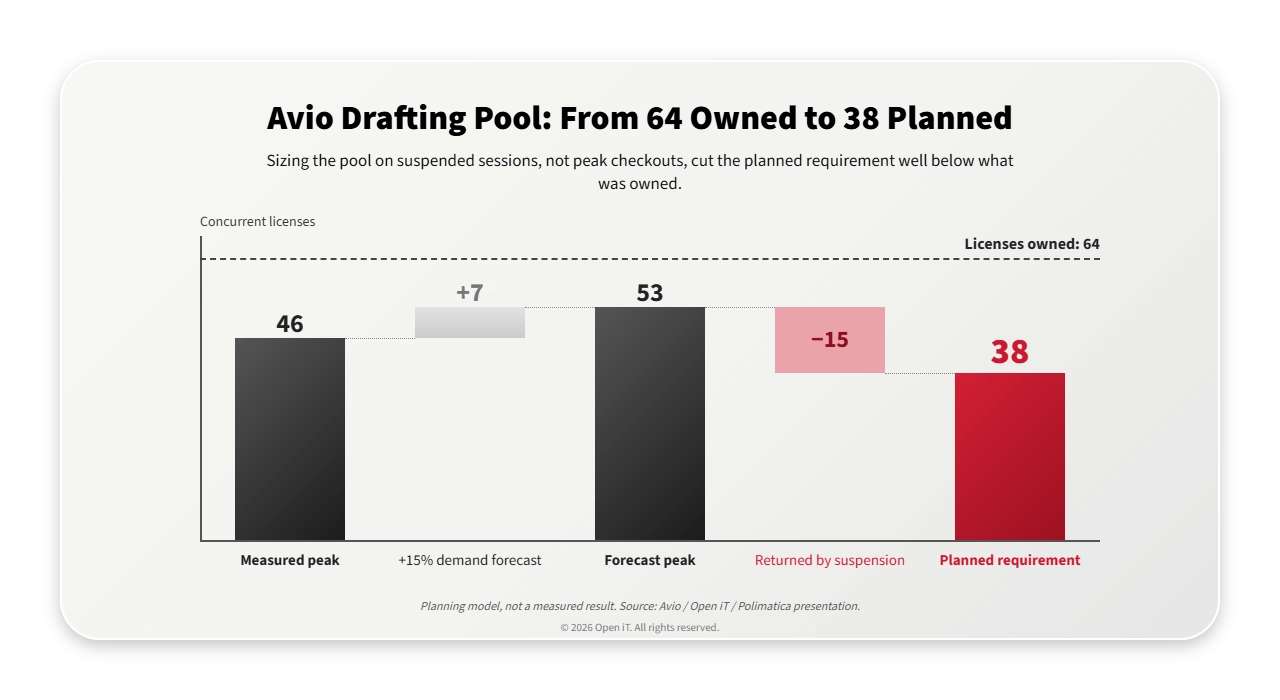
In the project’s second phase, Avio suspended inactive applications and released their licenses. Licenses moved between users faster.
よくある質問
What does it mean to suspend a license?
The idle application is paused on the workstation with the engineer’s work in place, and its concurrent license goes back to the pool. When the engineer resumes, the application takes a license again.
Is suspending a license the same as license reclamation?
No. ServiceNow SAM calls that process software reclamation: it uninstalls unused software or cancels unused subscriptions so the rights can be reallocated. Suspending returns a concurrent license from an idle session and leaves the install and the work in place.
Does ServiceNow SAM Pro reclaim concurrent engineering licenses?
Its software reclamation rules cover installed software and subscription software. Concurrent engineering licenses sit in ServiceNow’s engineering license management, which tracks license usage and license denials. Open iT is one of the integrations that feed it.
Why not rely on the idle timeout that came with the application?
It covers one vendor’s products. And it acts late: at its shortest setting, Ansys returns a license about 75 minutes after the session goes quiet. Open iT checks real activity on the workstation and applies one policy across vendors.
Can we protect critical work from suspension?
Yes. You can mark hosts, users or groups whose applications Open iT never suspends.
Measure the gap before you set a policy
Pick one pool where engineers already hit license denials. Run Open iT in log-only mode, which records sessions without acting on them. At the hours the denials happen, compare sessions in active use with licenses checked out.
That gap is the most licenses suspension could return at peak. Set your first rules from it, not from a vendor default. Keep software reclamation for the installs and subscriptions nobody uses. Ask Open iT for an observe-only assessment of your most contested pool: one pool, measured session by session, with no session touched.
The CFX session that went quiet at 8:30 is holding a license you’ve already paid for. Suspend it, and that license goes back to work.