


- A license harvesting policy decides when an idle engineering session gives its license back and whose work is never touched.
- In aerospace and defense, write the policy last. First measure what’s checked out, then what’s actually in use, closed areas included.
- Avio Aerospace measured first and found 64 drafting licenses owned but never more than 46 out at once. Only then did it suspend idle applications.
A license harvesting policy is the set of rules that decides which idle engineering sessions give their license back, and when. In aerospace and defense, it's the last thing you should write. Harvesting acts on an engineer's open session, and you can't set fair rules for usage you can't see yet.
This is the third post in our license harvesting series. The first explained how harvesting spots an idle session. The second covered what suspending a license does. Open iT’s 3 Simple Steps to a Safe and Flexible Software License Optimization sets out the general principles. This post covers what aerospace and defense teams need in place before those principles can work.
One idle clock doesn’t fit an aerospace engineering floor
Take one program on a weekday. Designers work in CATIA from morning to evening. Analysts start CFD runs that compute for hours with nobody at the desk. A test team keeps sessions open for the length of a campaign. Drafting licenses sit idle through lunch and every design review.
One timeout treats all of them the same. Set it short, and it warns a test engineer in the middle of a campaign. Set it long, and drafting licenses stay checked out through every peak. As Open iT’s guidance says: “Different software applications may require different optimization parameters and harvesting procedures.”
You want licenses back at peak, without touching anything a program milestone depends on. And you want engineering leads to sign the policy.
What a license harvesting policy decides
- When a session counts as idle: set per application, from keyboard, mouse, CPU and I/O. A solver keeping the CPU busy isn’t idle.
- How the engineer is warned: a pop-up gives a window to cancel.
- What happens next: suspend, which keeps the work in memory, or close after an automatic save.
- Who gets different treatment: priorities by host, user or group, and rules by time of day and weekday.
The mechanics are in blog one. Every one of these decisions needs data you may not have yet.
What you can’t see yet
Four blind spots turn a harvesting rule into a guess.
Checked out isn’t the same as used
The license server records who holds a license and since when. Whether anyone is working is a fact only the workstation knows.
The closed side is the least measured part of the estate
Air gaps are a normal operating condition in this industry. A tool that needs a connection to analyze its data can’t work there.
Several license managers and frozen baselines
Ansys licenses through FlexNet. CATIA licenses through DSLS. Three programs may run three validated versions of the same tool, and they can’t upgrade on a vendor’s schedule.
Your SAM platform holds what you own
ServiceNow’s engineering license management describes the pool in one line: “When the user exits the application, the license returns to the pool.” An idle session never exits. And ServiceNow’s software reclamation rules work on installs and subscriptions, not on open sessions.
What it costs to write the policy blind
A loose policy changes nothing. Idle checkouts stay out, the peak looks like real demand, and the renewal adds licenses. Avio Aerospace metered a drafting application for a year. It owned 64 concurrent licenses and never had more than 46 checked out at once. The other 18 sat in the pool, paid for.
A tight policy fails louder. Harvesting without proper rules can “interrupt a CAE simulation halfway through,” and a crash on close “may mean losing a whole day’s work.” One lost model before a design review, and engineering asks you to switch harvesting off.
Three steps to a policy engineering will sign
Harvesting is the last of three steps in engineering software asset management (ESAM). Open iT has called automatic harvesting "the peak level of any effective engineering software management program". LicenseAnalyzer™ is built the same way: each level builds on the one before it.
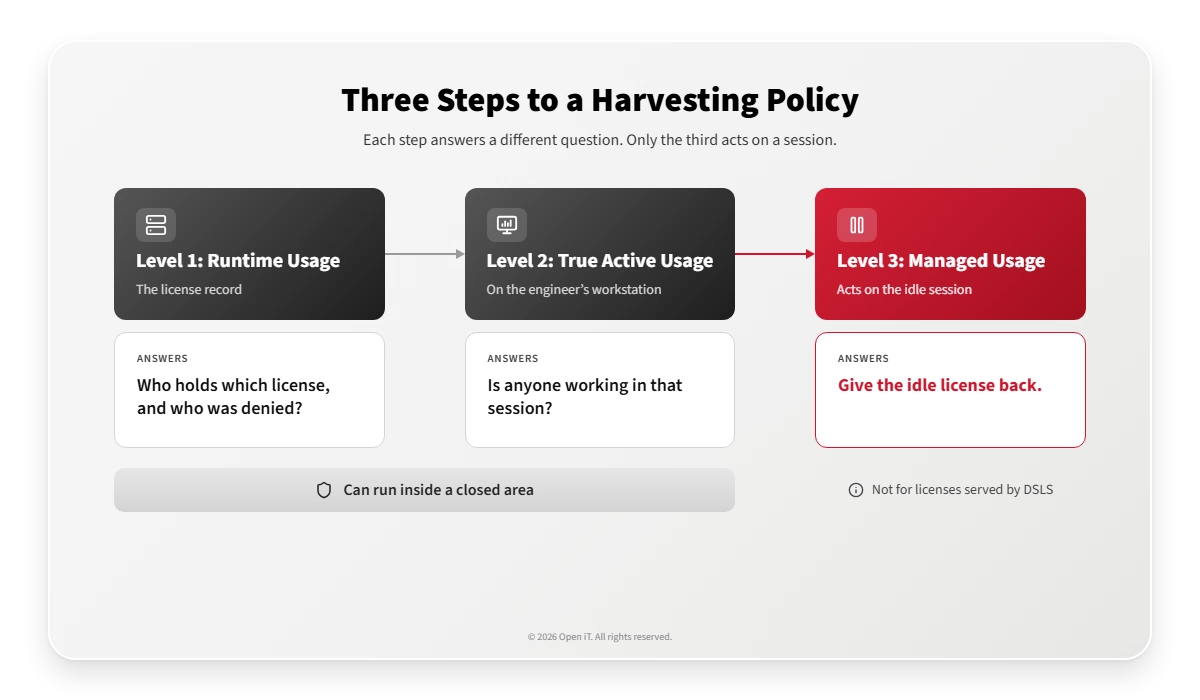
- Measure the license record (Level 1, Runtime Usage). Checkouts, denials and an audit trail from every license server. Version is part of the record, so frozen baselines get measured too. In a closed area, metering, reporting and analysis all run inside the boundary, and no data has to cross it.
- Separate active from idle (Level 2, True Active Usage). Keyboard, mouse, CPU and I/O on each workstation show which checked-out licenses are in use.
- Write and apply the harvesting rules (Level 3, Managed Usage). Run a log-only week first: Level 3 records every session and acts on none. Then set the rules from your own data, with engineering leads in the room.
What your license harvesting policy will look like
Once steps 1 and 2 show where the idle time sits, the policy can be this simple. The groups are examples. Swap in your own.
| Group (example) | Applications (example) | Priority | What the priority does | Action when idle |
|---|---|---|---|---|
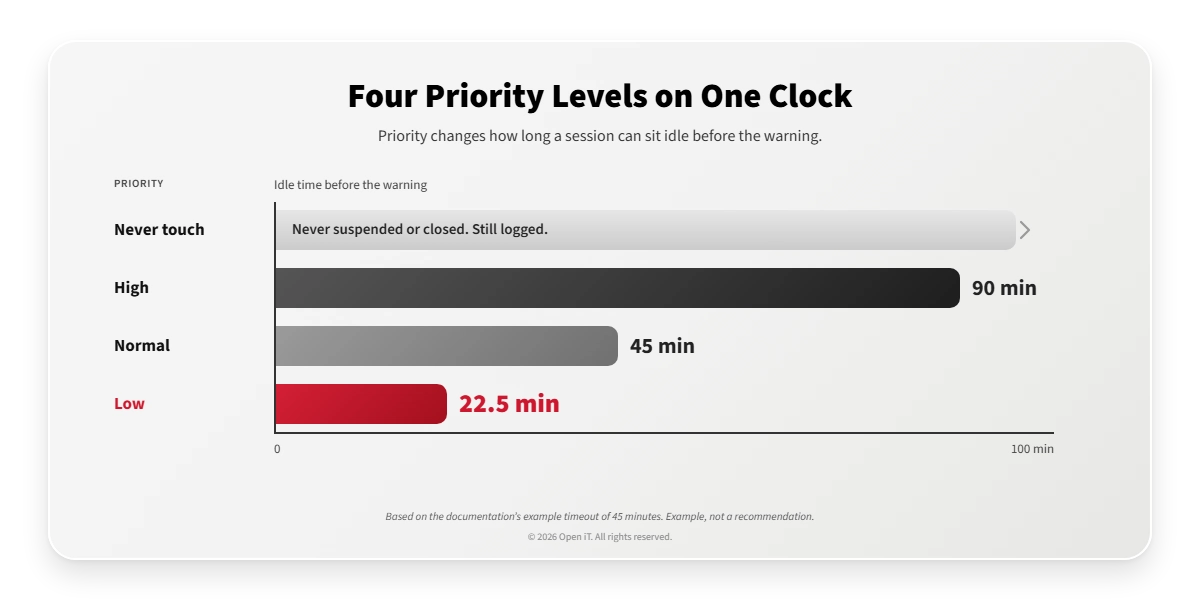
| Certification and test-campaign hosts | Any | Never touch | Never suspended or closed. Still logged. | None |
| Analysts running long solves | Ansys CFX | High | Idle timeout doubled | Suspend |
| Designers on FlexNet or IBM LUM tools | CAD | Normal | Default idle timeout | Suspend, so the model stays in memory |
| Drafting and occasional users | Drafting tools | Low | Idle timeout halved | Close after an automatic save |
With the documentation’s example timeout of 45 minutes, a high-priority session waits 90 minutes and a low-priority one 22.5. Treat those as examples. Your own data sets the real numbers.
Avio measured first, then suspended
Avio builds propulsion for civil aeroengines, military programs and space launchers. Its starting point was a familiar one: “Getting actual data on SW resources usage was becoming essential.” In-house and existing commercial tools weren’t holding up.
Phase one metered 13 license servers and 500 PCs and workstations with Open iT, across sites in Italy and Poland. That’s where the 46-of-64 finding came from. Phase two suspended inactive applications and released their licenses. User demand grew 15%, licenses circulated faster, and the drafting plan came in at 38 licenses against the 64 owned.
Frequently asked questions
Do we need license harvesting to see engineering license usage?
No. LicenseAnalyzer Level 1 records checkouts and denials, and Level 2 separates active from idle use. Neither acts on an engineer’s session.
Can usage be measured in an air-gapped or classified area?
Yes. Open iT installs as a self-contained deployment inside the closed area. Metering, reporting and analysis run there, and no data has to cross the boundary.
Can we harvest CATIA licenses?
Not when CATIA runs on DSLS. Level 3’s suspend works with FlexLM, LMX, IBM LUM and RLM. For CATIA on DSLS, Open iT measures usage and denials for renewal evidence.
Will a harvesting policy interrupt a running simulation?
Not when the run is computing. Level 3 counts a session with CPU or I/O activity as busy, and you can mark solver hosts as never touch.
Does Open iT replace ServiceNow SAM Pro?
No. ServiceNow keeps the record of what you own. Open iT measures what gets used and feeds that data into ServiceNow through its Store app.
Start with the record, not the rules
Pick the estate where the next renewal or audit will hurt most. Start with a Level 1 usage assessment: it meters one renewal cycle across your license servers and shows the gap between the capacity you own and the capacity anyone used. In a closed area, it runs entirely inside the boundary. Ask Open iT to scope it.
With that gap on the table, you write the harvesting policy from your own evidence. Then the drafting licenses that sat idle through this morning’s design review go back to the pool, while the test team’s sessions stay exactly where they left them.