


- Roll out IT chargeback in four stages: target, define, test, deploy. Showback is the test. You price last year’s usage with the new model and send each budget holder the result.
- Set next year’s budgets from the showback figures, then bill at rates you hold for the year.
- Set the first billing date when showback starts, and hold it.
- Charge on measured use, not checkouts.
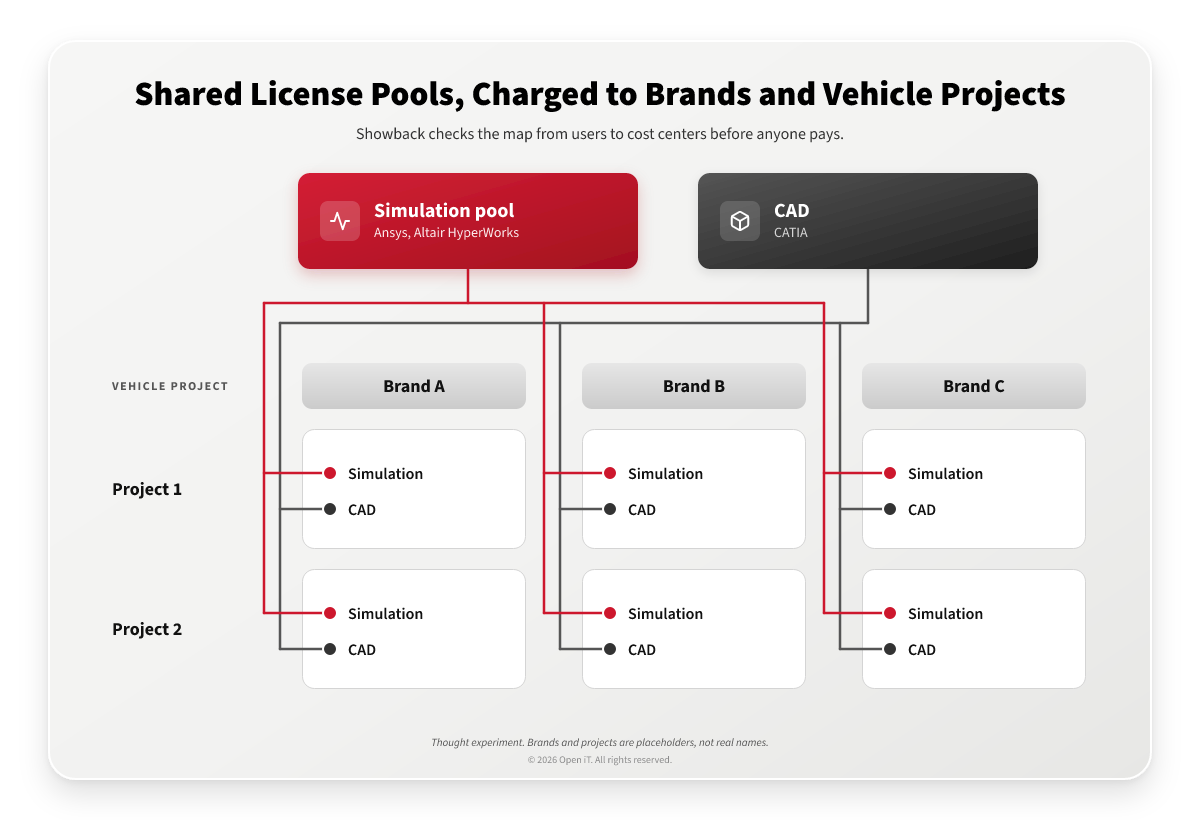
Take one large automotive organization, selling cars and trucks under several brands, running more than 100 production facilities in over 25 countries. For the thought experiment, assume its engineers design in CATIA and run simulation in Ansys and Altair HyperWorks, shared across every brand.
We will assume the group buys those licenses centrally. Somebody has to decide which brand and which vehicle project pays for which part of the cost, and how to introduce that charge without a fight.
The IT chargeback process answers that in a set order. Price the model on real usage, show people what it means for them, then bill. For a CFO, the sequence is budget first, bill second, reconcile once a year.
How do you roll out showback before chargeback? Run IT chargeback in four stages. Target a few high-priority applications. Define what you charge for, who pays and how each charge is calculated. Test the model as showback: price last year’s usage and send each budget holder their figures. Then deploy chargeback at rates set from that test and held for the year, and settle any surplus or deficit once a year.
Why the order matters to finance
A wrong showback figure costs a corrected report. A wrong charge has already moved money from one budget to another. In a group whose brands are run by separate companies, it has moved money between companies’ accounts, and taking it back means credit notes and intercompany adjustments.
The year-end reconciliation doesn’t fix this. It corrects the total that IT recovers, not who paid it. If the map from users to cost centers was wrong, or the allocation basis didn’t fit the license, the reconciliation pays back or charges extra along the same wrong lines. Blog 1 covers the map.
Showback and chargeback also change behavior in different ways. The FinOps post on showback and chargeback covers that side. This post covers the order of work.
The IT chargeback process in four stages
To implement IT chargeback and showback, Open iT recommends four stages. Showback sits in the third.
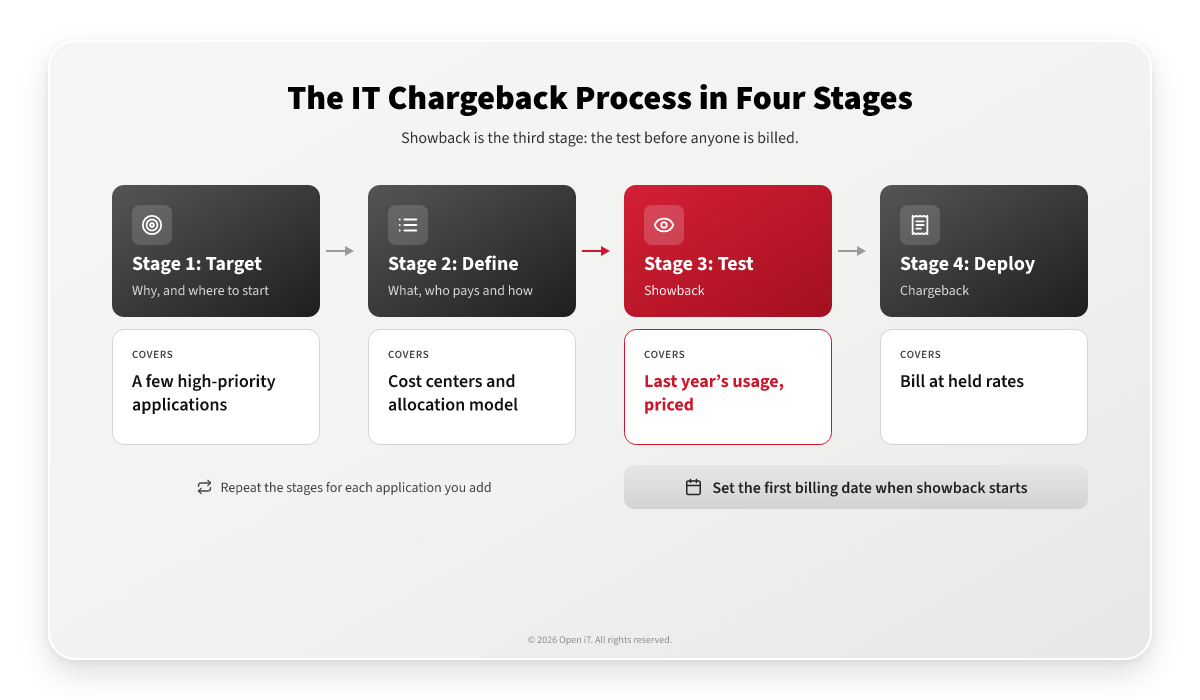
- Target. Decide why you’re introducing chargeback before you decide how. Then pick the scope. Start with a few high-priority engineering applications the software asset manager already knows well, because their costs are easier to estimate when there’s no usage history yet.
- Define. List what you buy and on what terms, because that decides the unit you charge in and the allocation model. Settle the exceptions now, such as weekend use or an application with one user all month. Then name the internal customers, the cost centers that will pay. The model should be easy to explain to any budget holder, easy for IT to verify, and fair to most of the people paying.
- Test, which is showback. Price last year’s usage with the new model and send each cost center its figures. Because the test prices usage you already have, showback doesn’t have to wait a year for new data. If you have no usage history yet, price the model against what your current method charges. The test shows which policies are missing and which license agreements need to change. It also shows where a unit or an allocation model needs adjusting. And it’s the cheap place to try alternatives, such as a different rate for a bundled license. Set the first billing date on the day showback starts. Without a date, budget holders review figures that carry no consequence, and the hard conversation only moves to later.
- Deploy, which is chargeback. Bill at the tested rates. Add the remaining applications, then their license agreements, and run the stages again for each addition. Hold the rates. If one has to change, change it at a planned review, so budget holders can still predict what they’ll pay.
What finance does at each stage
| Stage | Finance decides | Finance gets |
|---|---|---|
| Objetivo | Why chargeback, and which applications first | A short list of costs to recover |
| Define | The cost centers, who owns each one, and who receives each invoice | A charging model it can explain |
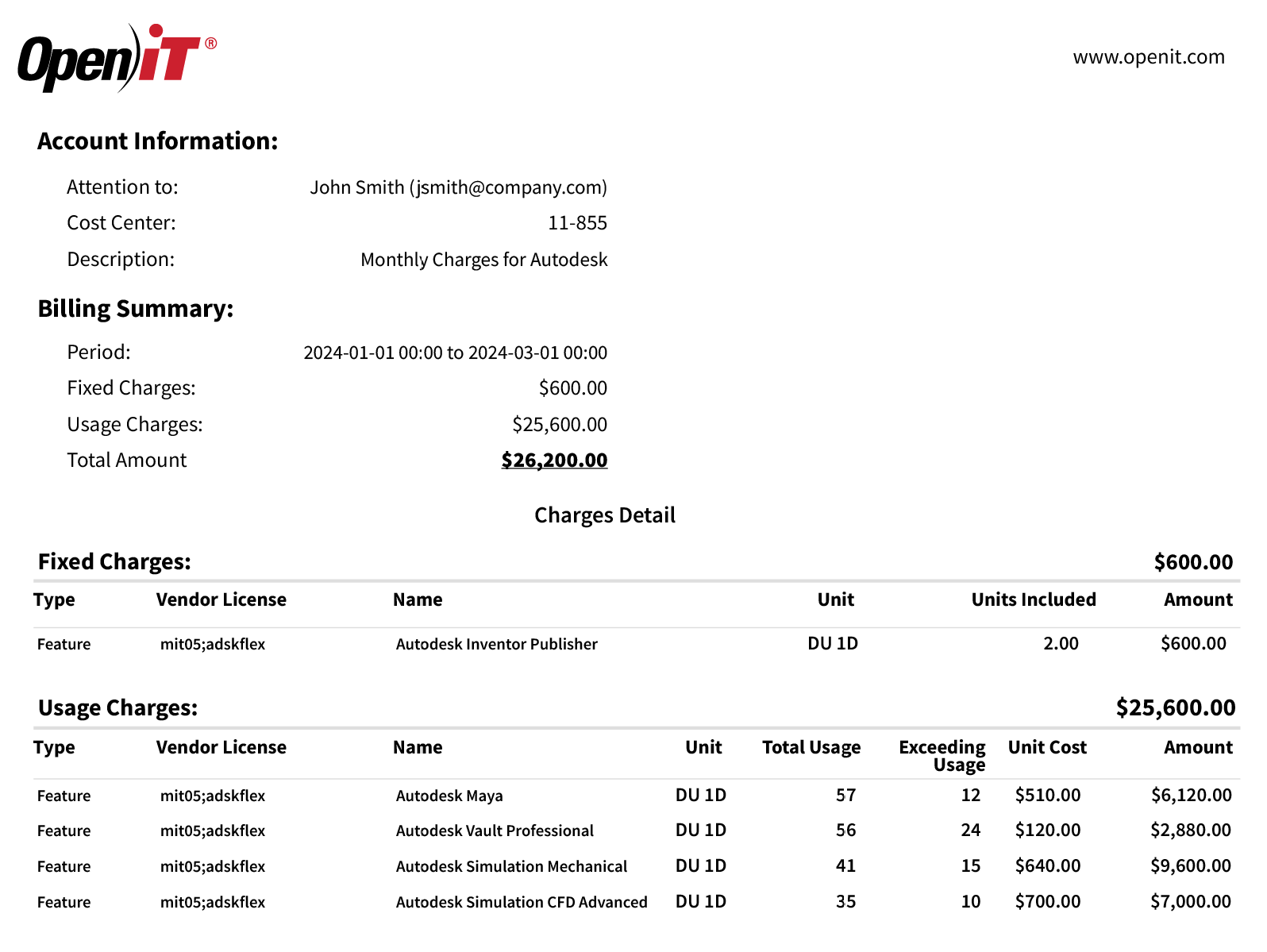
| Test (showback) | Next year’s budget per cost center, and the first billing date | A showback invoice per cost center: period, fixed charges, usage charges, total |
| Deploy (chargeback) | When to invoice, such as quarterly | The same invoice, now charged |
| Year end | How to settle the surplus or deficit | A profit and loss statement for the chargeback services |
The year-end step is the one finance owns outright. Rates are set before the year’s usage is known, so each service ends the year with a surplus or a deficit. If IT isn’t meant to keep a surplus or carry a loss, settle it once a year, paying back or charging extra to the business units. Reconcile the total, or a group of services, rather than every line item.
The thought experiment: an automotive group, stage by stage
- Start with simulation. In this example, teams across every brand share the same Ansys and Altair HyperWorks license pools, so who used what is the first question finance will ask.
- Let the cost centers follow the group’s structure: the brands, and the vehicle projects that cut across them. A design tool used all day and a simulation pool used in bursts may need different units, so each gets its own allocation model.
- Price last year’s usage for each brand and each vehicle project, and send every budget holder their figures. With several brands and many projects, the map from users to cost centers is the hard part, and showback is where it gets checked.
- Bill each brand at the tested rates, held for the year.
Metering also changes what gets charged. A license checked out is not the same as a license in use. Across Open iT’s engineering deployments, 20 to 40% of checked-out licenses typically sit idle. Charged on checkouts, each brand would pay for that idle time without seeing it. Charged on measured use, the showback figures show it before anyone pays.
What the group would get:
- Each brand sees its engineering software cost in its budget before it’s billed, and each vehicle project carries the software it used.
- Before a CATIA, Ansys or Altair renewal, the group knows which brands and projects drive the cost and how much of the pool sits idle.
When to switch from showback to chargeback
Switch on the billing date you set when showback started. Use the showback period to get these done before it:
- The model has been tested on last year’s usage and the rates are set.
- Every budget holder has seen their showback figures and checked the names listed under their cost center.
- Next year’s budgets include those figures.
- Someone owns the map from users to cost centers.
If something is still open on the billing date, billing starts anyway. Fix the open item at the first quarterly review rather than moving the date.
Where LicenseAnalyzer and LicensePlanner fit
LicenseAnalyzer™ meters engineering software across 100+ license managers and cloud services, covering 6,000+ applications. In the example above, that means CATIA through Dassault Systèmes License Server (DSLS), Ansys through FlexNet, and Altair HyperWorks through Altair License Manager. It records who used which application and for how long, and maps each user to a department or cost center. It can also map DSLS project paths to project names, so usage can be charged to a project. With active-usage monitoring on the engineer’s workstation, it separates a license that’s checked out from one that’s in use.
LicensePlanner™, its plugin, prices the usage. The same invoice serves showback and chargeback: cost center, period, fixed charges, usage charges and the total, addressed to the person who manages it. So the switch to chargeback needs no new report. Finance starts charging the amounts it has been reviewing.
LicensePlanner also tracks estimated, budgeted and actual software maintenance cost for each year, and handles the year-end reconciliation with a profit and loss statement. See how it works as IT showback and chargeback software, or read more about IT chargeback and showback at Open iT.
Preguntas frecuentes
What is the IT chargeback process?
A sequence of four stages: target the applications to charge for, define the services, cost centers and allocation model, test the model as showback on last year’s usage, and deploy chargeback at the tested rates. The stages repeat each time an application is added.
How do you roll out showback before chargeback?
Price last year’s usage with the new model, send each budget holder their figures, and set next year’s budgets from them. Fix the first billing date when showback starts, then bill at rates held for the year.
What happens at year end when fixed rates don't match actual usage?
Each service ends the year with a surplus or a deficit. Settle it once a year with a profit and loss statement, paying back or charging extra to the business units, and reconcile the total rather than every line item.
See showback and chargeback invoices per cost center
Your budget holders will ask what they’ll pay before they agree to pay it. Schedule a live demo and we’ll show how LicenseAnalyzer and LicensePlanner turn engineering software usage into showback and chargeback invoices per cost center.